


Pocket Radar® Sports
3.2102.00 Reviews
App Specs
- Version
- 2.4.2
- Updated On
- License
- Free
- Downloads
- 100,000+
- Developer
- Pocket Radar, Inc.
- Categories
- Sports
- Platform
- Android
Screenshots
 Analysis by AppCompare
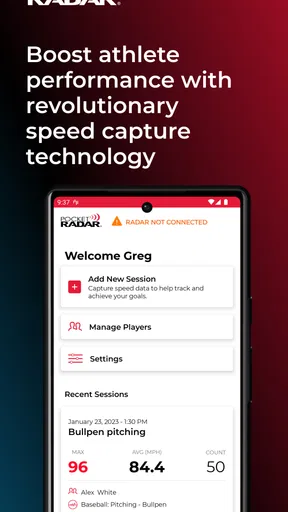
My first piece of advice for a new user is to separate the phone app from the equipment it works with. Pocket Radar® Sports is not a radar that turns a phone into a speed gun by itself: its training features require the Smart Coach Radar device. That distinction matters before you download it or plan a practice. If you already have the radar, the app can bring speed readings and video into one training workflow; if you do not, installing the app alone will not give you those readings.
What to expect from the app
This is a sports-training app from Pocket Radar, Inc., built around measuring speed and reviewing practice rather than providing general workout plans or coaching lessons. I would think of it as a companion for a specific piece of equipment, not as a stand-alone sports utility. The app is free to download, though in-app purchases are available, and the listed age guidance is Everyone. Its current version is 2.3.0, and it has an average rating of 3.4 from around 500 ratings, so I would approach it with practical expectations rather than assume every athlete will find it a perfect fit.
The useful question is not simply whether you play a sport, but whether speed is something you can measure and act on in your sessions. A pitcher checking delivery pace, a coach organizing repeatable drills, or a player tracking acceleration may get a clear purpose from it. Someone who mainly wants a calendar, strength plan, or broad activity tracker is likely better served by a different kind of sports app.
Before your first session
Start by making sure you have access to the compatible Smart Coach Radar device. Since the app depends on that hardware for its central job, it is worth confirming that the device is available to you before building a practice around the phone. Then install the app, bring both pieces to the training area, and allow yourself a little time to connect them before the session gets busy. The most reassuring first setup is a quiet one: test the connection and the basic workflow before teammates or athletes are waiting for their turn.
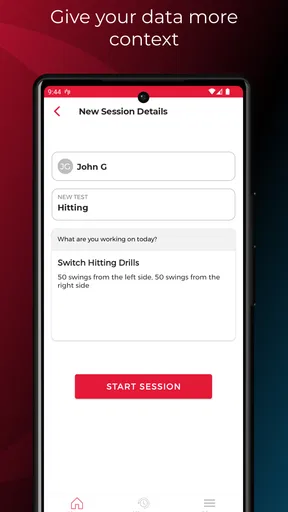
I also recommend deciding what you want to learn from the session before recording anything. “Get faster” is too broad to guide useful practice. Pick one repeatable action—such as a particular throw, serve, or sprint—and keep the conditions as consistent as you reasonably can. That makes the numbers easier to compare and the video more meaningful. The app can help collect information, but it cannot make two attempts comparable if the drill, effort, or setup changes each time.
Getting to a first useful result
For a first run, keep the goal small: connect the radar, capture a few attempts of the same movement, and check that the resulting speed information is useful to you. Once that basic loop makes sense, try the audio feedback or video workflow rather than turning on every possibility at once. A simple test helps you spot whether you are holding the phone in a practical place and whether the person training can hear or review feedback without interrupting the drill.
One small coaching habit makes a difference here: record a short set, pause, and review before repeating the same exercise for a long stretch. That gives you a chance to catch a setup problem early. If the speed readings are not lining up with what you expect, first check whether the radar is positioned consistently and whether the attempts are being made under similar conditions. Treating a single reading as a verdict on an athlete is less helpful than looking for a pattern across comparable efforts.
Worth Reading Before You Choose

Flipboard Shows What News Apps Must Do Beyond the Feed

Switching to Android Auto Means Rethinking Your Driving Routine

Google Calendar Makes a Crowded Week Easier to Manage

Ludo King Makes the Most of the Minutes Between Plans

Baby Panda World Brings Quick Play to Modern Phones, but Its Game Library Feels Busy

ESPN’s Live Game View Makes Following Close Games Easier
Where the workflow can be confusing
The biggest source of confusion for a first-time user is the boundary between the app and the radar hardware. The phone is the interface for the training workflow, but it is not the sensor that measures speed. If you expected to install an app and immediately measure a ball or a runner, that expectation needs adjusting. The equipment requirement is the main practical hurdle, and it also affects whether the app is convenient for casual, unplanned practice.
It is also worth distinguishing speed feedback from a complete performance analysis. A number can tell you how fast an attempt was, while video can help you revisit what the movement looked like; neither automatically explains why one attempt was better. I would use the readings to guide a question—did the same drill produce a steadier result, for example?—and use the recording as context, not as a substitute for coaching judgment.
How it fits into real training
The app is most useful when speed is a meaningful part of a sport-specific practice and you can repeat the same action enough times to learn from it. Its appeal is less about replacing a coach and more about making a training session easier to observe. The combination of readings and recorded movement can help a player connect an outcome to the attempt that produced it, while a coach can use a shared session to keep feedback grounded in what actually happened.
A realistic practice, not a perfect lab
Imagine a parent taking a young player to a field after school. Rather than measuring every throw, they agree on one simple target: repeat the same kind of throw for a short set, then review the attempts together. The parent can focus on running the session, while the athlete concentrates on the movement and listens for the speed feedback. A quick video review can make the discussion more concrete than relying on memory alone. The point is not to turn an ordinary practice into a testing event; it is to leave with one observation the player can use next time.
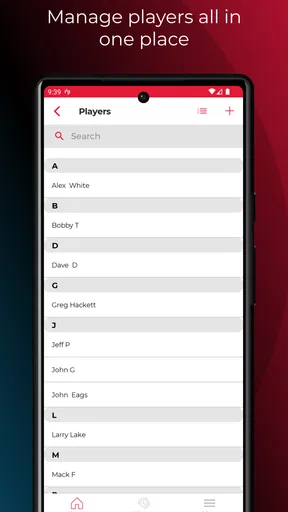
For a team coach, the same approach can keep a station from becoming a queue around a phone. Set up the radar workflow before the group arrives, decide who is recording, and keep the drill consistent for each athlete. If multiple players take turns, note whose attempts are being reviewed rather than assuming a sequence of readings will be self-explanatory later. That little bit of organization protects practice time and makes the information easier to use after the session.
How it compares with familiar alternatives
Compared with a traditional radar gun, the app’s strongest reason to be in the kit is the connected training workflow: readings can sit alongside session review and video rather than living only as spoken numbers or handwritten notes. A dedicated radar gun may be the simpler choice if all you need is an occasional speed check and you do not care about building a record around practice. With this app, the hardware requirement and phone-based workflow are part of the value, but also part of the setup.
Compared with a general fitness tracker, it is much more focused on sport-specific speed attempts. A wrist tracker or running app may suit someone who wants everyday activity trends or a broader picture of exercise; this is a better match when the question is about a particular pitch, shot, or sprint and the compatible radar is on hand. It is not a substitute for a training plan, and I would not choose it just because I wanted a single app to manage every aspect of fitness.
Making readings more useful
A less obvious benefit of recording a consistent drill is that it can reveal variation, not just a best result. If one attempt is unusually fast, that may be exciting, but a repeatable range across similar attempts can be more useful for planning practice. I would avoid turning every session into a hunt for a personal record. Use the app to notice whether a change in technique or warm-up seems to coincide with a steadier set, then test that observation again rather than treating one session as proof.
Video is most helpful when you decide what to watch before replaying it. Pick one visible detail that matters to the movement, review a few attempts, and resist the urge to diagnose everything at once. Pairing a speed reading with a specific moment in the recording can sharpen a coach-athlete conversation, but too much reviewing can slow practice and make a player self-conscious. A short, focused check is often a better trade-off than replaying every attempt.
For shared use, agree on a simple naming or note-taking habit outside the measurement itself: identify the athlete and drill when you save or discuss a session. This is especially useful when a coach is working with several players or when a parent revisits clips later. The app can collect training material, but people still need a clear way to remember what each set was meant to represent.
Who should consider it—and who should pass
I would recommend trying it if you already have access to the compatible radar and regularly practice a movement where speed matters. It makes the most sense for coaches, serious recreational athletes, and families who want a more concrete way to discuss a child’s progress. The video element can be particularly helpful for someone who learns by seeing a movement rather than hearing a number alone.
I would skip it if you do not have the required device, only need occasional rough estimates, or want a free phone-only speed measurement tool. It may also be more process than a casual player needs: bringing the radar, connecting the app, and organizing a repeatable drill is worthwhile only when you expect to use the result. If your priority is general conditioning, route tracking, or workout reminders, a conventional fitness app will probably fit your routine better.
Cost, expectations, and a sensible next step
The app itself is free, but that does not remove the hardware requirement, and its in-app purchases range from around a dollar to around fifty dollars per item. I would check what you actually need before spending on anything within the app. A first-time user should begin with the basic connection and a small practice test, then decide whether the workflow suits their sport and coaching style. That is a more sensible way to judge its value than assuming every listed feature will matter to your training.
There are trade-offs in taking a phone into practice. You need to manage the device while keeping attention on the athlete, and a video-centered session can become distracting if everyone starts watching the screen after every repetition. Decide in advance when to record and when to put the phone aside. The app is at its best when it supports the drill without becoming the drill.
My experience and final recommendation
When I first stumbled upon the Pocket Radar® Sports, I was a bit skeptical. "A radar in my pocket? Really?" But boy, was I in for a surprise! Straight out of the box, the app’s interface is clean and intuitive. It doesn’t bombard you with unnecessary frills; it's all about functionality, which I appreciate. The setup was a breeze, and I was off to the races in no time.
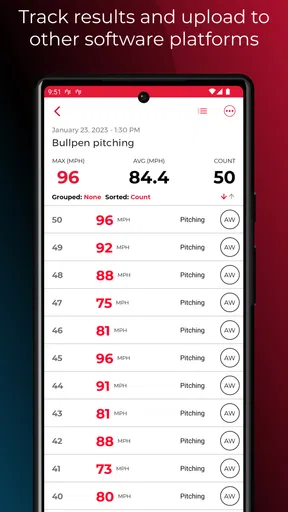
The app works in tandem with the actual Pocket Radar device. Connecting the two was as simple as pie. Once synced, the app becomes your control center, displaying speed data in real-time. You can view individual sessions or track your progress over time—a feature that's super handy for both athletes and coaches.
Features That Stand Out
What really sets this app apart is its versatility. Whether you're into baseball, tennis, or even track and field, the app’s got you covered. The ability to track speeds from a variety of sports makes it a valuable tool in any athlete’s arsenal. And let's not forget the real-time audio feedback feature, which allows you to stay focused on your game without constantly checking your phone. It's like having your own personal coach, whispering stats in your ear.
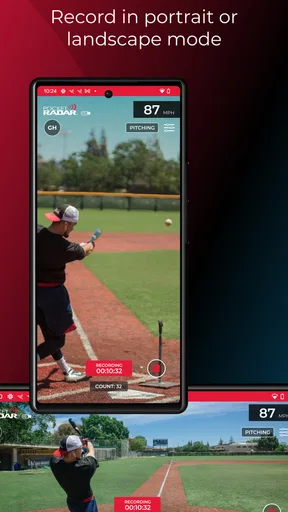
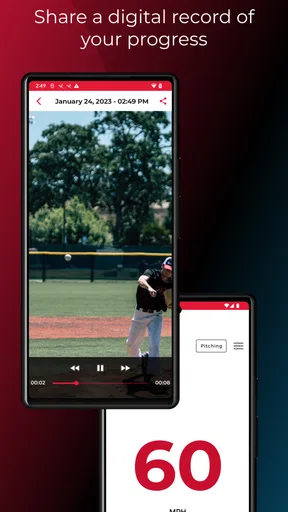
Another cool feature is the video playback. You can record your sessions and overlay speed data, which is perfect for breaking down your technique. Imagine seeing exactly how fast your pitches are or how quick your sprints get. This is where the app goes from being just a radar tool to a comprehensive training aid.
Performance and Reliability
Now, a radar app is only as good as its accuracy, right? I'm happy to report that this little powerhouse delivers impressively reliable results. I tested it against a traditional radar gun, and the readings were consistently spot on. It’s refreshing to have a tool that you can trust without second-guessing.
Battery life is another win. You won't find yourself scrambling for a charger after every session, which is a huge relief if you're out on the field all day. The app runs smoothly without any noticeable lag, even when you're recording video. It's clear the developers put a lot of thought into the app's performance, ensuring it runs as efficiently as possible.
Who Is It For?
So, who exactly can benefit from the app? In short, anyone involved in sports where speed is a key factor. Coaches looking for a convenient way to gather data, athletes striving to improve their performance, or even parents who want to keep an eye on their kids' progress—it’s a perfect fit for all these scenarios.
What I find particularly appealing is how accessible it makes high-tech training tools. You don't need to be in a professional sports facility to access top-notch data. Just a field, your phone, and this app, and you're good to go.
My Final Thoughts
To wrap it up, the app combines portability with speed readings and offers features that can serve different sports. Whether you're looking to fine-tune your technique or simply want to track your progress, it can be a useful part of practice when paired with the required radar device.
In a world where technology is often synonymous with complexity, it's refreshing to find a tool that simplifies the process without sacrificing quality. If you're serious about improving your speed and performance, giving this app a shot is a no-brainer. So, what are you waiting for? Lace up those shoes, grab your Pocket Radar, and get ready to take your game to the next level!
Pros
- Accurate speed measurements for sports.
- Compact and easy to carry around.
- User-friendly interface and setup.
- Compatible with various devices.
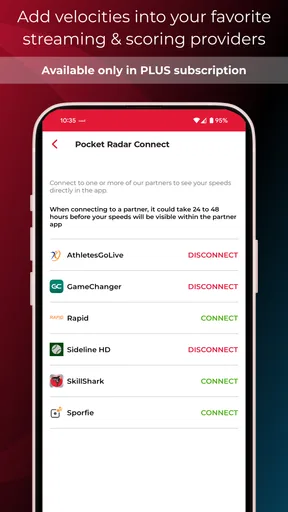
- Real-time data sharing options.
Cons
- Higher price point than some alternatives.
- Limited to measuring speed only.
- Battery life could be improved.
- Requires stable hand for accurate readings.
- Not waterproof
- handle with care.
FAQs for Pocket Radar® Sports
What is Pocket Radar® Sports and how does it work?
Pocket Radar® Sports is a mobile app designed to work with the Pocket Radar device, which accurately measures the speed of moving objects like baseballs, softballs, and other sports equipment. The app connects to the device via Bluetooth, allowing users to track performance, view historical data, and share results in real-time.
Is Pocket Radar® Sports compatible with all smartphones?
Pocket Radar® Sports is compatible with both Android and iOS devices. However, it requires Bluetooth connectivity and specific operating system versions. Users should check the app store listing for the latest compatibility requirements to ensure smooth functioning with their device.
Does the Pocket Radar® Sports app require a subscription?
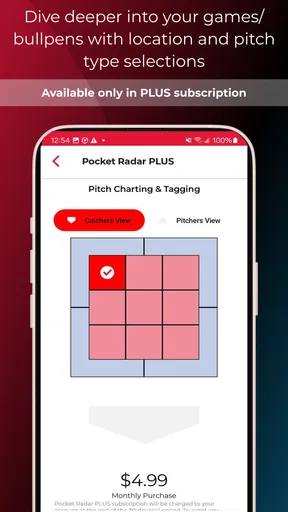
The basic functionalities of the Pocket Radar® Sports app are available for free. However, there may be premium features or advanced analytics that require a subscription or one-time purchase. Users should review the app’s pricing details on the app store page for more information.
Can I use Pocket Radar® Sports without the Pocket Radar device?
The Pocket Radar® Sports app is primarily designed to work with the Pocket Radar device to measure speed accurately. While you can explore some features without the device, full functionality, including speed measurement, requires the paired hardware.
How accurate is the speed measurement on Pocket Radar® Sports?
The Pocket Radar device, when used with the Pocket Radar® Sports app, provides highly accurate speed measurements, comparable to larger, more expensive radar guns. The precision is within +/- 1 MPH, making it a reliable tool for coaches, athletes, and sports enthusiasts.


